


Deep Learning . Training with huge amount of data .PART1
Performance considerations
I would like to put some consideration about Performance in Keras , in order to obtain the max GPU consideration.
What we are going to do , is train a Keras Model.
Here the number of images :
Now we define a generator used to train in batch of 32 ( can be an other number ), and we put this generator in the following call:
model.fit_generator(train_generator, steps_per_epoch= \ numper_of_train_samples/batch_size, validation_data=validation_generator, \ validation_steps=number_of_validation_samples/batch_size, epochs=epochs, verbose = 1)
The generator is so defined that reads image from disk, n-images exactly how the batch size is:
def generator(generator_samples, batch_size, shape ): num_samples = len(generator_samples) while 1: # Loop forever so the generator never terminates … read from disk and append info images and angles array # end of the batch, yield the images gathered yield sklearn.utils.shuffle(np.array(images) , np.array(angles))
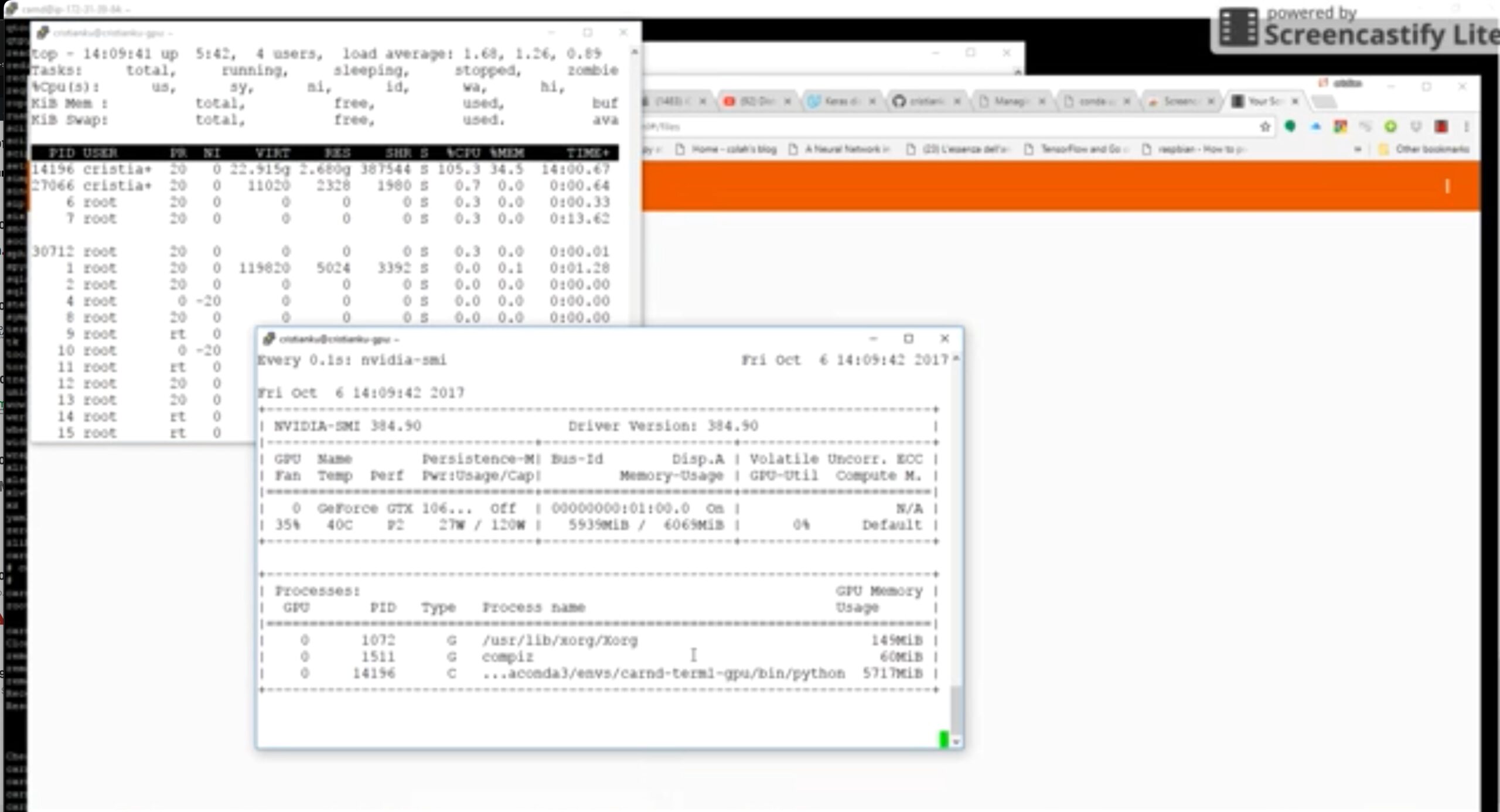
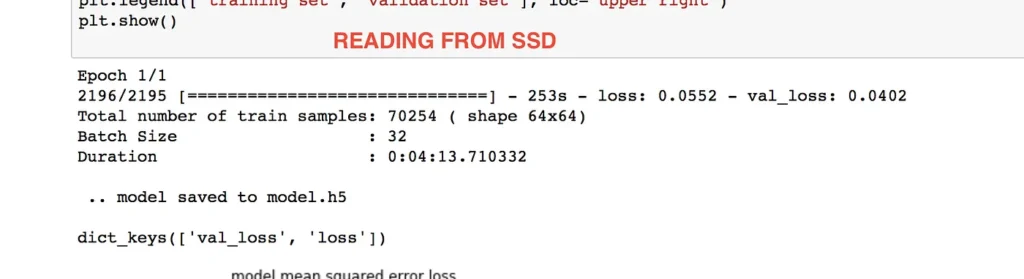
Now we start the fit_generator… and take a closer look at the CPU and GPU utilization to understand how the data is flushing in between , from CPU to GPU and back….. Look at the CPU working at full speed in order to handle the sparse disk reads and the GPU waiting for job… and sometimes doing nothing
Training Statistic:
So .. whats the next idea ?
Very simple ! load ALL the images in MEMORY !!
Is a good idea ?? Yes and now… if we have a lot of memory… but its not a scalable option because if we add in the future new images.. it can happen that the program explodes…in out of memory exception…
but lets take a look at the performance now :
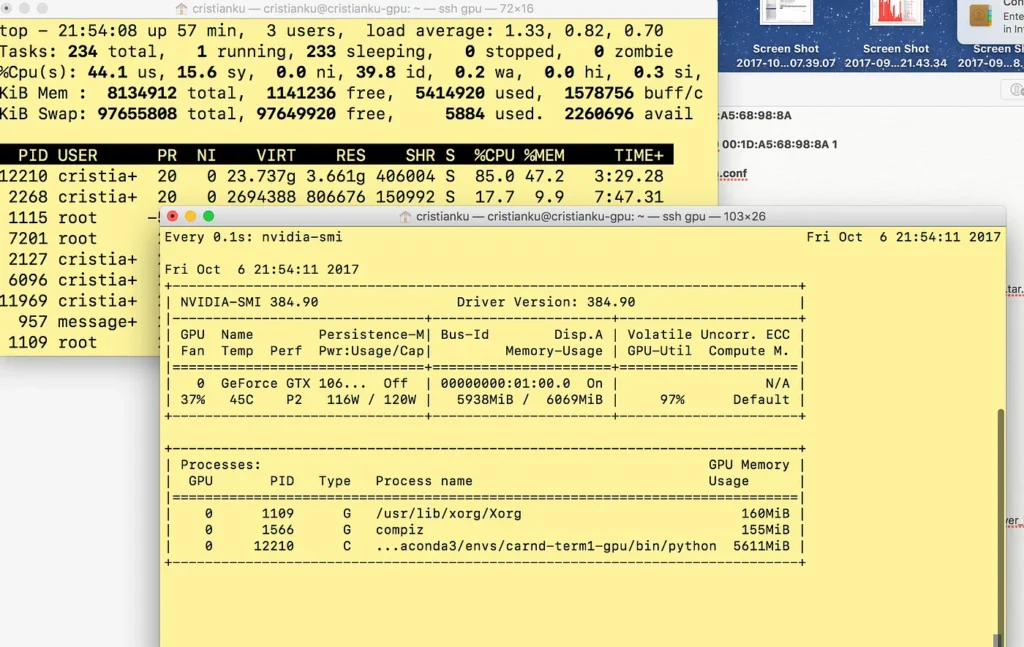
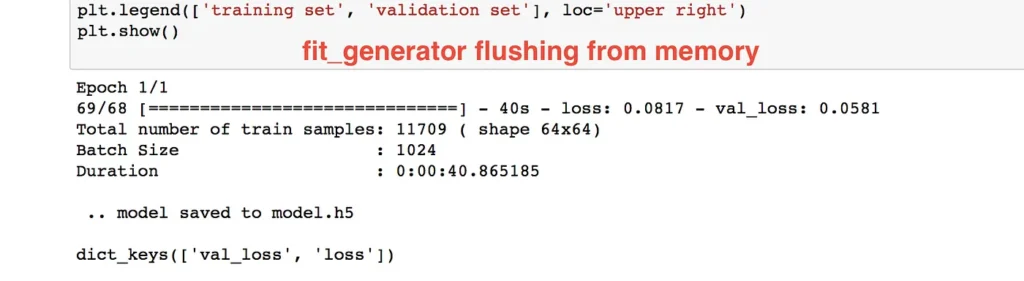
As you can see the GPU is at full speed. Although it was not a full speed all the time. We see later to resolve this with a threaded generator.
IS FITTING EVERYTHING IN MEMORY A GOOD IDEA ??
The answer is : NO!!!!
Ideally we should try to keep a buffer in memory where a “worker” can feed the GPU very fast, and .. the remaining data on a SSD waiting to be put in the Memory buffer by an other “worker”
Lets give a try to the Pytables, saved in a .hdf5 file.
def generator(samples, labels, batch_size, shape ):
    num_samples = len(samples)
    while 1: # Loop forever so the generator never terminates
#         sklearn.utils.shuffle(samples)
        for offset in range(0, num_samples, batch_size):
            batch_samples = samples[offset:offset+batch_size]
            batch_labels  = labels[offset:offset+batch_size]images = []
            angles = []
            for batch_sample, batch_label in zip(batch_samples, batch_labels):

                images.append(batch_sample)
                angles.append(batch_label)# end of the batch, yield the images gathered
#             print (batch_sample.shape)
            yield sklearn.utils.shuffle(np.array(images) , np.array(angles))
#             return sklearn.utils.shuffle(np.array(images)  , np.array(angles))
py_training_samples.append(output[0][None])
The None is needed to creare a additional first dimension, as the output[0] is the image size, so we end to have a (1,128,128,3 ) that is the same as defined above: shape=( 0,resized_shape, resized_shape, 3))
If you try to define the table fieldshape=( resized_shape, resized_shape, 3)), without the first dimension, you will get this error:
ValueError: When creating EArrays, you need to set one of the dimensions of the Atom instance to zero.
What about the file dimension ? , 5 Gigabytes!!!!:
-rw-r — r — 1 cristianku cristianku 4.993.236.504 Oct 9 23:51 samples.hdf5
Now lets configure the generator to use the Pytable … No! there is no adjustment here.. it works exactly like a Numpy Array !:
Here my generator:
def generator(samples, labels, batch_size, shape ):
    num_samples = len(samples)
    while 1: # Loop forever so the generator never terminates
#         sklearn.utils.shuffle(samples)
        for offset in range(0, num_samples, batch_size):
            batch_samples = samples[offset:offset+batch_size]
            batch_labels  = labels[offset:offset+batch_size]images = []
            angles = []
            for batch_sample, batch_label in zip(batch_samples, batch_labels):

                images.append(batch_sample)
                angles.append(batch_label)# end of the batch, yield the images gathered
#             print (batch_sample.shape)
            yield sklearn.utils.shuffle(np.array(images) , np.array(angles))
#             return sklearn.utils.shuffle(np.array(images)  , np.array(angles))
Epoch 1/1
2541/2540 [==============================] - 35s - loss: 0.0679 - val_loss: 0.0407

Total number of train samples: 81282 ( shape 128x128)

Batch Size : 32

Duration : 0:00:35.566706
And now the verdict ! The Performance ???
Its even better than the entire numpy array in memory !!!
We still have a problem.
Normally , for each epoch, we do Shuffle the data , in order to have more “randomly distributed training data”
how we can shuffle 5 giga of data ??
So… we have a batch size of 32 sample for example… we can read from Pytable more than that in a single fetch.. lets say 10 times more… and shuffle this chuck of data:
def generator(samples, labels, batch_size, shape ):
 num_samples = len(samples)
 while 1: # Loop forever so the generator never terminates
# sklearn.utils.shuffle(samples)
 for offset in range(0, num_samples, batch_size*100):
 # loading into memory a BIG chunk of data ( 3200 samples )
 chunk_batch_samples = samples[offset:offset+batch_size*100]
 chunk_batch_labels = labels[offset:offset+batch_size*100]
 # shuffling them
 chunk_batch_samples,chunk_batch_labels = sklearn.utils.shuffle(chunk_batch_samples,chunk_batch_labels)

# print (“ offset = {}, len(chunk_batch_samples) {}”.format(offset, len(chunk_batch_samples)))
 images = []
 angles = []
 # looping on the Chunk of 3200 samples , extracting 32 elements ( batch_size) every time
 for offset2 in range(0, len(chunk_batch_samples), batch_size):
 chunk_batch_samples = chunk_batch_samples[offset2:offset2+batch_size]
 chunk_batch_labels = chunk_batch_labels[offset2:offset2+batch_size]for batch_sample, batch_label in zip(chunk_batch_samples, chunk_batch_labels):images.append(batch_sample)
 angles.append(batch_label)yield sklearn.utils.shuffle(np.array(images) , np.array(angles))
With this method, we do Shuffle the data, maintain a Memory at only 25%
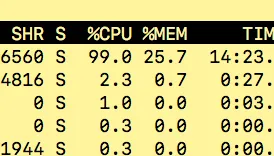
and we have more or less the same good performance of having everything in memory:
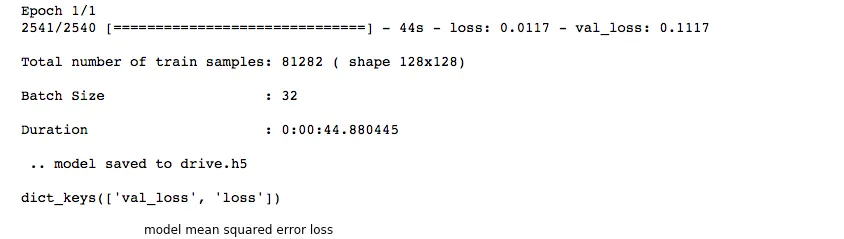
Our Training is NOW SCALABLE, FAST, and RELIABLE is indipendent from the number of Images to train… we can have a million of images and the machanism is the same !
Whats next ? Next time I will go deep and further improve the mechanism, by introducing two different threads :
CPU1: reads a big chunk from disk ( 3200 samples ), shuffle it, and insert a memory Buffer ( Queue)
CPU2: the second one is the generator that extract a small amount from this buffer ( the batch size = 32 samples)
GPU: last one is the Keras/Tensorflow calculations done in the GPU
Articoli recenti
- LLM Wiki: Andrej Karpathy’s Brilliant Idea to Build a Living Knowledge Base
- Elon Musk’s Views on Universities and Industrial CAD/CAM: A Push for Self-Learning and Innovation
- 🔥 Skywalker Roaster Controller – Custom Interface with Arduino
- Deep Learning . Training with huge amount of data .PART2
- Deep Learning . Training with huge amount of data .PART1
 Italian
  English